If you spend most of your day at a desk, there’s a good chance your neck or lower back has let you know about it — a dull ache by mid-afternoon, tension headaches, or that “locked up” feeling when you finally stand up. A lot of it traces back to how your workstation is set up, and to how long you sit in any one position, good or bad. Here’s what actually helps.
Why a forward head position is harder on your neck than it looks
Every inch your head drifts forward off your shoulders — reaching toward a laptop screen, cradling a phone against your ear, hunching over a keyboard — changes the physics of how your neck has to hold it up. Standing or sitting with your head balanced directly over your shoulders, your neck only has to support your head’s actual weight, about 10 to 12 pounds for an average adult. The moment your head tilts forward, gravity starts pulling it further from that balance point, and your neck and upper back muscles have to work exponentially harder to keep it from dropping.
A widely cited spine study measured exactly how much that load grows as the head tilts forward:
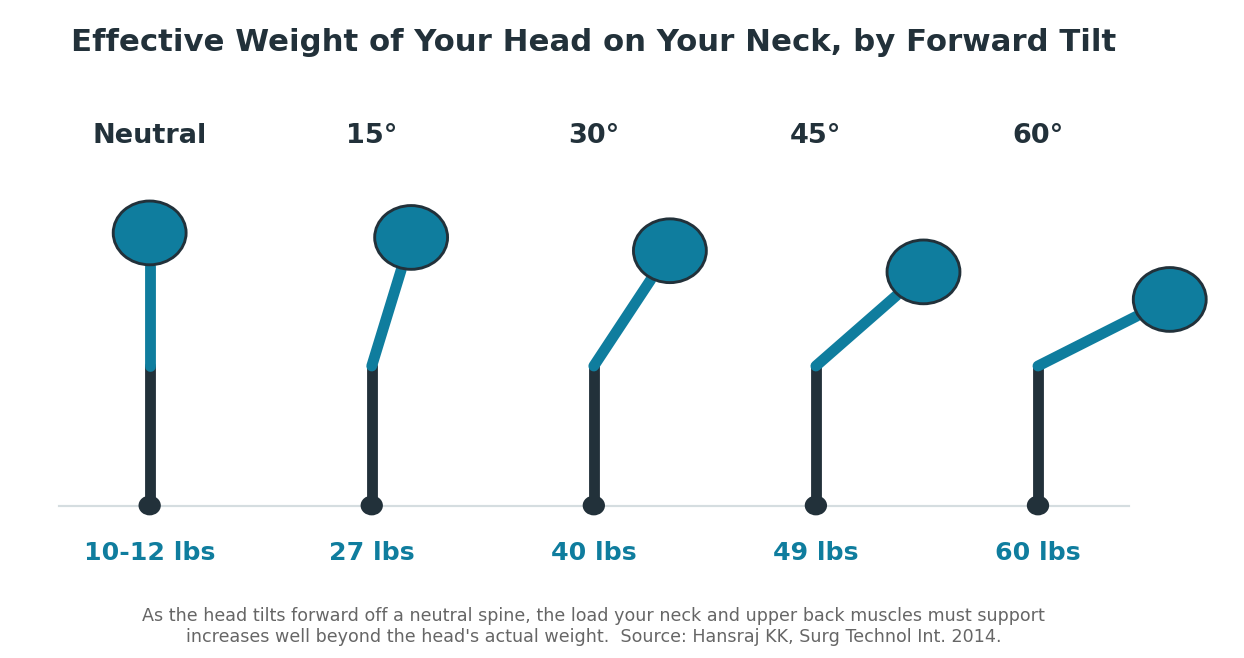
At just 15 degrees of forward tilt — a fairly mild “looking down at your phone” angle — the load on your neck more than doubles to around 27 pounds. By 60 degrees, which is closer to how most people actually look down at a phone in their lap, it reaches roughly 60 pounds — the equivalent of carrying a seven- or eight-year-old child on the front of your neck all day. This is often called “text neck,” and the same forward-shift pattern shows up with poorly positioned monitors and slouched desk posture, not just phones.
The reason this matters more than a single moment of strain is repetition and duration. Your neck can handle a brief forward tilt without issue. The problem is doing it for hours a day, five days a week, for years — which is exactly what a desk job with a poorly positioned screen adds up to. Over time, that sustained extra load contributes to muscle fatigue, tension headaches, and accelerated wear on the discs and joints of the cervical spine, which is a large part of why so many desk workers end up with chronic neck and upper back pain that doesn’t fully resolve with rest alone.
1. Get your monitor to eye level
If you’re constantly looking down at a laptop or a monitor that sits too low, your head tilts forward and your neck muscles have to work to hold it up — for hours at a time. The top of your screen should be roughly at eye level, about an arm’s length away. If you work on a laptop most of the day, a stand or even a stack of books under it, paired with a separate keyboard, makes a real difference.
2. Support your lower back
Feet flat on the floor, knees at roughly a right angle, and something supporting the curve of your lower back — whether that’s your chair’s built-in lumbar support or a small cushion. Sitting on the edge of your seat or sinking into a chair with no lower-back support for hours at a time is one of the most common causes of the low back tightness people notice by the end of the day.
3. Keep your elbows and wrists neutral
Your keyboard and mouse should be positioned so your elbows sit at roughly 90 degrees and your wrists stay straight, not bent up, down, or to the side. Reaching up to a keyboard that’s too high, or angling your wrists on one that’s too low, adds up over a full workday.
4. The real fix is movement, not perfect posture
Here’s the part people miss: there’s no single “correct” posture you can hold all day and be fine. Even a good position becomes hard on your spine if you never move out of it. Standing up, stretching, or just walking to refill your water every 30 to 60 minutes matters more than finding the theoretically perfect chair angle. If you can alternate between sitting and standing during the day, even better.
5. Signs it’s worth getting checked
Occasional end-of-day stiffness is common and often resolves with the changes above. It’s worth getting evaluated if you’re dealing with headaches that start at the base of your skull, numbness or tingling that runs down an arm into your hand, pain that doesn’t ease up over a weekend off, or stiffness that’s gradually gotten worse over weeks or months. Those can point to something that a few ergonomic tweaks won’t fully fix on their own.
How we can help
Dr. Gill evaluates desk-related neck and back pain regularly and can help identify whether it’s a posture and movement issue, something more mechanical, or a combination of both — and build a plan around it. Learn more on our Chiropractic Care page, or come in for a free consultation.
DEALING WITH DESK-RELATED PAIN? CALL 425-228-2225
Free consultation • Serving Renton, Fairwood & south King County
This page is general wellness information, not a substitute for individualized medical advice. If you have sudden, severe, or worsening symptoms, please seek medical care.
No Comments